
Filing with California’s Department of Tax and Fee Administration (CDTFA) shouldn’t feel like decoding ancient tax scrolls, but for most e-commerce sellers, it does. Between tracking nexus thresholds, calculating rates across 500+ jurisdictions, and remembering deadlines, compliance becomes a second full-time job nobody asked for.
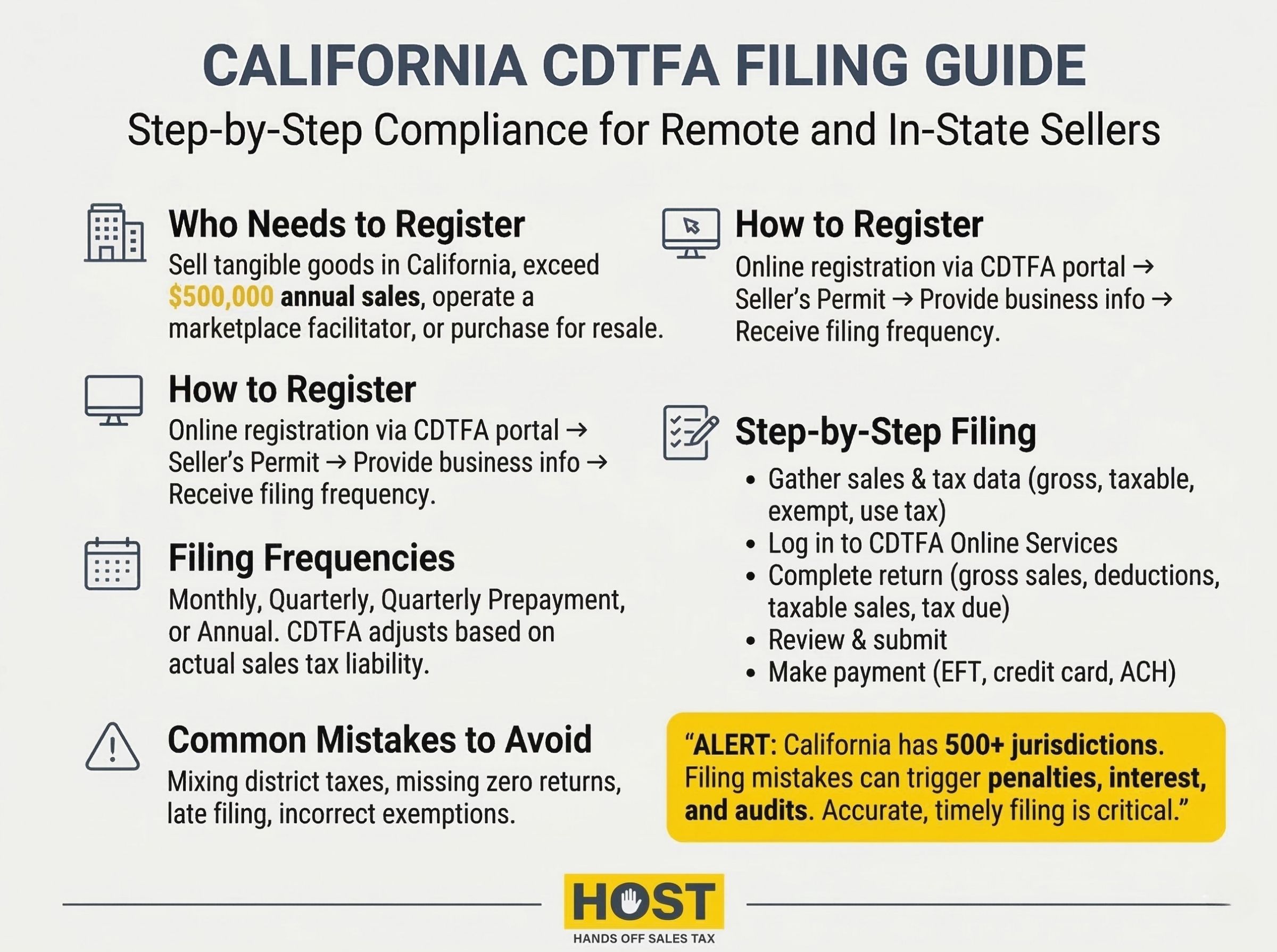
California represents the largest state economy in the U.S. The CDTFA oversees sales and use tax collection across all 58 counties, and getting your filings right isn’t optional. It’s the difference between smooth operations and audit nightmares.
That’s where Hands Off Sales Tax (HOST) makes the difference. We’ve spent 25+ years focused exclusively on sales tax services, helping businesses navigate California alongside 44 other states. From nexus analysis to automated filings, we handle the complexity while you focus on growth.
What Is the CDTFA?
The California Department of Tax and Fee Administration manages the state’s sales and use tax program, plus over 30 other tax and fee programs. For most businesses, the CDTFA means one thing: sales tax collection and enforcement.
California’s statewide base rate sits at 7.25%, but combined state and local rates can exceed 10% in some jurisdictions. The CDTFA collects these taxes from registered businesses, then distributes portions to local governments.
After the 2018 South Dakota v. Wayfair decision, California implemented economic nexus rules. Remote sellers must register and collect sales tax once they exceed $500,000 in annual California sales, effective April 1, 2019.
For businesses operating in California, filing accurate CDTFA returns is mandatory. Skip it or file incorrectly, and penalties start at 10% of the tax due.
Registration: The First Step
You can’t file returns until you’re registered. Here’s what triggers the requirement.
Who Needs to Register?
Registration is mandatory if you:
- Sell tangible personal property in California
- Exceed California’s $500,000 economic nexus threshold
- Operate a marketplace facilitator platform
- Purchase items for resale in California
Even out-of-state sellers face collection obligations once they hit significant California sales volume.
How to Register
Registration happens online through the CDTFA Online Services portal:
- Create an account at the CDTFA website
- Select “Register” then “Seller’s Permit”
- Provide business details (legal name, EIN, structure)
- Specify anticipated sales volume
- Receive filing frequency assignment
- Submit your application
Most applications process within 5-7 business days. You’ll receive your seller’s permit number and filing instructions.
If nexus determination feels murky, HOST’s nexus analysis service pinpoints exactly where you have obligations and handles registration paperwork across all required states.
Understanding Filing Frequencies
The CDTFA assigns filing frequency at registration based on anticipated or actual sales tax liability.
Monthly Filing: For businesses with higher tax liability. Returns due by the last day of the following month (January sales due February 28).
Quarterly Filing: Most common frequency for mid-sized businesses. Returns due April 30, July 31, October 31, and January 31.
Quarterly Prepayment: Businesses averaging $17,000+ in monthly tax liability make prepayments on the 24th of the first and second months of each quarter, plus file a quarterly return.
Annual Filing: For minimal California sales. Returns due January 31 covering the full calendar year.
The CDTFA reviews accounts periodically and adjusts frequencies based on actual performance. You’ll receive written notification of any changes.
How to File CDTFA Returns: Step-by-Step
Step 1: Gather Sales Data
Before filing, compile accurate records:
- Total gross sales (taxable and exempt)
- Taxable sales by jurisdiction
- Sales tax collected from customers
- Exempt sales with documentation
- Use tax owed on purchases
Most businesses use point-of-sale systems or sales tax automation software. The CDTFA can audit three years of past returns, so accuracy matters.
Step 2: Access CDTFA Online Services
Log into the CDTFA’s Online Services portal, select your seller’s permit account, and click “File a Return.” Need visual guidance? CDTFA offers free video tutorials walking you through each screen at cdtfa.ca.gov/video-resources.
Step 3: Complete Your Return
The form requires:
Gross Sales: Total revenue from California customers before deductions.
Deductions: Report exempt sales with documentation, like resales with valid certificates, sales to exempt organizations, interstate commerce, certain food products.
Total Taxable Sales: Gross sales minus valid deductions.
Sales Tax Rate: The system calculates based on customer locations. For remote sellers, use destination-based rates.
Total Tax Due: Taxable sales multiplied by applicable rates.
Amount Due: Final balance after any prepayments.
Step 4: Review and Submit
Before submitting, verify:
- Correct reporting period
- Accurate sales figures
- Proper deductions claimed
- Appropriate tax rates applied
Submit electronically and save your confirmation number.
Step 5: Make Payment
Payment must accompany your return:
Electronic Funds Transfer (EFT): Required for businesses averaging $10,000+ monthly tax liability. Important: Paying by check when EFT is required triggers a 10% penalty even if you filed on time.
Credit Card: Accepted up to $200,000, with processing fees (typically 2.3%).
ACH Debit: Available through Online Services with no additional fees.
If you can’t pay the full amount, the CDTFA offers payment plans, but penalties and interest continue accruing.
Common Filing Mistakes to Avoid
Mixing Up District Taxes
California has 500+ local tax jurisdictions with varying rates. Applying wrong rates (even by 0.25%) creates audit liability. Online sellers must charge rates based on customer location, not business location.
HOST offers a free sales tax software review to identify configuration errors before they become problems.
Failing to File “Zero” Returns
No California sales during a reporting period? File anyway. “Zero” returns are mandatory. Skipping them triggers penalties and potential permit suspension.
Missing Deadlines
Late filing means automatic penalties:
- 10% penalty if 1-30 days late
- Additional penalties for longer delays
- Interest on unpaid balances
Set calendar reminders or use automated services.
Incorrectly Claiming Exemptions
Claiming exempt sales without proper documentation invites audits. Valid resale certificates must include purchaser’s permit number, authorized signature, item descriptions, and proper dates.
Keep certificates organized and accessible. During audits, you prove exemptions. Not the CDTFA.
What Happens After Filing
Confirmation: Receive electronic confirmation of filing and payment.
Processing: CDTFA processes within 2-3 business days. Errors trigger clarification requests.
Account Updates: Your online account reflects filing history and payment status.
Potential Audits: The CDTFA uses analytics to identify returns warranting review.
If you receive a CDTFA notice, respond promptly. HOST’s notice management service interprets confusing notices and handles responses, protecting you from penalties.
HOST: Your California Compliance Partner
Filing CDTFA returns correctly requires attention to detail, understanding complex rate structures, and consistent deadline management. For businesses managing California alongside dozens of other states, the administrative burden becomes overwhelming fast.
What HOST Delivers
Nexus Analysis: We analyze sales data to determine exactly where you have California nexus and which jurisdictions require collection.
CDTFA Registration: We handle all registration paperwork, ensuring proper setup before your first filing deadline.
Automated Filing: We prepare and file your returns on schedule: monthly, quarterly, or annually, eliminating late penalties.
Multi-Jurisdiction Management: California’s 500+ local tax rates don’t faze us. We calculate correct rates for every customer location.
Software Optimization: Using TaxJar, Avalara, or other tools? We review your configuration to prevent costly errors.
Notice Management: Confusing CDTFA notices get interpreted and handled appropriately.
Audit Defense: Facing a CDTFA audit? We organize documentation, defend your position, and minimize liability.
We’ve been 100% focused on sales tax since 1999. Over 25 years helping businesses stay compliant while minimizing time drain. Founded by Mike Espenshade, with parent company TaxMatrix serving North America’s largest companies, we bring enterprise expertise to sellers of all sizes.
Ready to Simplify CDTFA Filing?
California sales tax compliance doesn’t have to consume 30+ hours monthly or create constant audit anxiety. The right partner handles complexity, ensures accuracy, and gives you back time for growth.
Whether you’re making your first CDTFA filing, expanding into California, or managing obligations across multiple states, HOST provides expertise and support for stress-free compliance.
Contact us today to discuss your California sales tax needs or schedule a free consultation. Let us handle the filing while you focus on sales.
Want to learn more? Download our free guide: “10 Sales Tax Mistakes E-Commerce Sellers Make.”
Frequently Asked Questions
How often do I need to file CDTFA returns?
Filing frequency depends on your California sales tax liability. The CDTFA assigns frequency at registration. Monthly, quarterly, quarterly with prepayments, or annually based on anticipated sales volume. They adjust your frequency as actual performance warrants.
What happens if I file my CDTFA return late?
Late filing triggers automatic 10% penalties for 1-30 days late, with additional penalties for longer delays. Interest accrues on unpaid balances. Consistent late filing can result in permit suspension or increased audit scrutiny.
Do I need to file if I had no California sales?
Yes. Even with no sales activity, you must file a “zero” return for each assigned reporting period. Failing to file zero returns can result in penalties and potential permit suspension.
How do I know which tax rate to charge California customers?
California uses destination-based sourcing, charging the rate based on customer location, not your business location. With 500+ jurisdictions, calculating correct rates manually is nearly impossible. Most businesses use automation software or partner with services like HOST.
Can the CDTFA audit my past returns?
Yes. The CDTFA can audit returns going back three years, or longer if fraud is suspected. They may request detailed sales records, exemption certificates, and documentation supporting claimed deductions. Maintaining organized records and accurate filings reduces audit risk.
What’s the difference between sales tax and use tax in California?
Sales tax is collected by sellers from customers on taxable sales. Use tax is owed by buyers when they purchase taxable items without paying sales tax, such as out-of-state purchases. Businesses report use tax on CDTFA returns for items purchased for business use where no sales tax was collected.
